













How to Build a Custom CRM System: A Step-by-Step Guide
iscover how to build a custom CRM system with our step-by-step guide. Learn the essentials of custom CRM development from Kanhasoft’s expert team.

managing customers with sticky notes and spreadsheets is about as effective as using a colander to carry soup.Every growing business hits the same wall: too many leads, too little organization, and one-too-many follow-ups that slipped through the cracks (right after your sales guy swore hed call by EOD). Thats where custom CRM development comes in not as a nice-to-have, but as a lifeline.
At Kanhasoft, weve helped dozens of businesses ditch the chaos and embrace streamlined, scalable solutions. So if you're considering building a custom CRM system from scratch, take a deep breath and lets walk through it together.
Step 1: Understand Why Off-the-Shelf CRMs Dont Cut It
Picture this: You install a generic CRM system. Youre excited. It has buttons. It has tabs. It even lets you color-code contacts like a preschool arts project.
But a month in, your team is ignoring it. Why? Because it doesnt align with your workflows. Youre left wrestling with features you dont need while the ones you do need are buried under six submenus and a prayer.
Custom CRMmeans creating a system that speaks your business language not translating your operations to fit someone elses template.
Step 2: Define Your CRM Goals (and No, More Sales Is Not Enough)
Sure, every CRM is meant to boost revenue but the real magic lies in defining how it will do that for your business. Start with these questions:
-
What kind of customer data do we need to track?
-
Which team members need access to what?
-
What processes should the CRM automate (e.g., email follow-ups, task assignments)?
-
What analytics or reports do we want to generate?
Think beyond features think functions. Because when you build a CRM around your processes, your team will actually use it (gasp!).
Step 3: Map the Workflow (aka, Draw Before You Build)
Before a single line of code is written, we roll up our sleeves and sketch out every user journey. This includes:
-
Lead capture flow
-
Sales pipeline stages
-
Client onboarding processes
-
Post-sale service or support flows
Pro tip: Get your actual users involved. Because theres nothing worse than deploying a shiny new CRM only to hear the sales team say, Cool but wheres the lead notes section?
And yes weve seen that happen. More than once. (Lets not talk about Version 1 of a CRM built entirely without sales team input. It was... educational.)
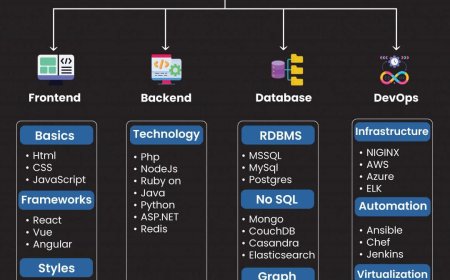
Step 4: Choose the Right Tech Stack (Spoiler: It Depends)
Were often asked, Should we build our CRM using Laravel? Node.js? React?
Answer: Yes. Maybe. It depends.
The tech stack should match the complexity, scalability, and performance requirements of your project. At Kanhasoft, we typically lean on robust, secure, and scalable frameworks like:
-
Frontend: React.js, Vue.js
-
Database: MySQL, PostgreSQL, MongoDB
-
Hosting: AWS, Azure, or your favorite cloud playground
The bottom line? Use tools that fit your goals not just whats trending on Hacker News.
Step 5: Develop in Modules (Because Monoliths Are So 2005)
Break your CRM into modules like:
-
Lead Management
-
Contact/Account Management
-
Task Management
-
Email/SMS Integration
-
Sales Pipeline
-
Reports & Dashboards
-
Role-Based Access Control
By building in modules, your CRM grows with you. Need to add billing integration later? No problem. Want a chatbot down the line? Youve got space for it.
Step 6: Test Like Your Business Depends on It (Because It Does)
A bug in a game is annoying. A bug in a CRM that deletes half your leads? Thats a team-wide panic attack.
Testing should include:
-
Unit tests for functions
-
Integration tests across modules
-
UI/UX testing with real users
-
Security testing (because GDPR compliance doesnt happen by accident)
As our dev team likes to say, A CRM isnt really done until it breaks and then gets fixed.
Step 7: Deploy, Train, and Get Feedback
Launch day is here. Pop the metaphorical champagne (but only after backups).
More importantly:
-
Train your team (not just one person whos expected to train everyone else while also doing their job).
-
Collect feedback daily, weekly, monthly. Your users will tell you what works and what doesnt.
-
Iterate. Even the best CRMs evolve.
Fun fact: One of our earliest CRM projects got a Version 2 within 60 days because the client realized they wanted drag-and-drop deal stages and couldnt live without it.
Final Thoughts: CRMs Arent One-Size-Fits-All Neither Are Businesses
At Kanhasoft, our motto is simple: Dont adapt to tools. Build tools that adapt to you.
Whether youre managing a sales team, a service business, or something gloriously complicated, custom CRMlets you take control of your data, your workflow, and your sanity.
So if you're still clinging to that color-coded Excel sheet like it's your lifeboat, maybe its time to build a better ship.
FAQs:
Q1. How long does it take to build a custom CRM system?
A: Typically, 816 weeks depending on complexity, features, and team size.
Q2. Is custom CRM development expensive?
A: It can cost more upfront than SaaS tools, but pays off with better efficiency and no monthly licensing fees.
Q3. Can I add more features later?
A: Absolutely! Thats the beauty of a modular custom CRM it grows with your business.
Q4. Whats the biggest mistake businesses make during CRM development?
A: Ignoring end-user input. If the team wont use it, even the best-built CRM becomes a digital paperweight.
Q5. Why choose Kanhasoft for CRM development?
A: We specialize in custom CRM development tailored to your workflow and we do it without overengineering or overpromising. Just results.