












Event Networking App Architecture: Key Components and Integration Strategies
In 2025, event planners began relying more on digital tools to improve event management. The event networking app is one particularly noteworthy application.


In 2025, event planners began relying more on digital tools to improve event management. The event networking app is one particularly noteworthy application. It's not just a chatbox or digital business card. A great deal of technological preparation goes into creating an app that genuinely connects people, which is the reason behind the seamless user experience.
We'll go over the components of a solid event networking platform in this article, as well as how integration is essential to enhancing user happiness and efficiency.
Just a concise, useful summary without any extraneous words or jargon.
The Significance of Architecture in Event Networking Applications
Let's begin with the fundamentals. Any piece of software is only as good as the base upon which it is constructed. An event matching app's speed, dependability, and capacity to manage thousands of users simultaneously are determined by its design.
When done correctly, users may contact one another, set up meetings, match with the appropriate individuals, and check calendars without any delays or issues. When done incorrectly, consumers post negative reviews, the software fails, and event planners lose credibility.
Thus, the architecture does matter.
Essential Elements of an App for Event Networking
A few essential components make up every event networking platform. What usually goes into one is as follows:
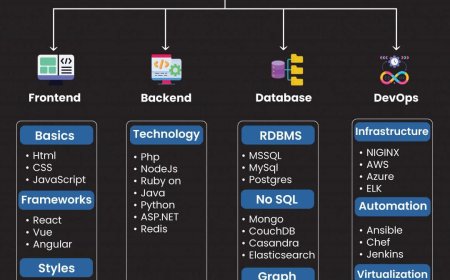
1. The user interface, or frontend
Users view and interact with this. It consists of:
-
The login page
-
Creation of user profiles
-
Suggestions for matching
-
system for messaging
-
Calendar or schedule
A virtual conference space (if it allows online calls)
The frontend may be mobile (iOS/Android), web-based, or both. It must be quick and simple to use, particularly for non-technical guests.
2. Backend (Data Processing and Logic)
This is the application's brain. It handles:
-
Taking care of user data
-
Using filters to match attendees
-
Keeping messages on file
-
Responding to API requests
-
Monitoring the activities of attendees
A strong backend has to be scalable, quick, and safe. The backend should be able to manage data flow without any issues if your event has more than 5,000 guests.
3. Database
Every piece of data is kept here:
-
Profiles of attendees
-
Interests and tags
-
Scheduled meetings
-
Messages
-
Participation in the session
Depending on the scale of the project, the majority of event applications employ cloud-based solutions like Firebase or relational databases like PostgreSQL.
Frequently Included Extra Features
A simple app can facilitate communication. However, the top event networking tool goes above and beyond. It consists of:
AI-Powered Matchmaking
According to user preferences, actions, or event objectives. Instead of meeting strangers, it helps guests meet the proper individuals.
Real-time Alerts
For updates on meetings, session alarms, reminders, etc.
Scanning Using QR Codes
to access actual booths or trade virtual business cards.
Integration of Video Calls
particularly for virtual or hybrid events.
Techniques for Event Networking Platform Integration
The majority of event applications are not standalone. To perform well, they must communicate with other systems. Integration can help with it.
The most beneficial integrations are listed below:
CRM Resources
CRMs like as Salesforce or HubSpot should be able to connect with your networking app. Meetings and interactions with attendees can then be preserved for use in next marketing campaigns or sales initiatives.
The networking app and the primary event platform are synchronized via event management systems. Among other things, this comprises session check-in tools, registration databases, and ticketing systems.
Syncing Calendars
Permit customers to connect Google Calendar or Outlook to their meeting schedules. They can keep up with event meetings thanks to it.
APIs for virtual meetings
Provide video call capabilities within the networking app by utilizing APIs such as Whereby, Zoom, or Jitsi.
Gateways for SMS and Email
helpful for follow-ups after an event, OTP login, and reminders.
Layers of Security That Must Exist
Apps that handle commercial and personal data must be protected. An effective event matchmaking software should do the following:
-
SSL/TLS data encryption for all data transfers
-
Secure logins using token-based authentication, such as JWT
-
Role-based access gives employees, visitors, and vendors distinct permissions.
-
Activity logs to monitor abuse or illegal access
-
Backup servers if the main system malfunctions
Don't cut corners on security. The reputation of the event can be destroyed by a single data leak.
Scalability and Load Handling
Imagine that within 15 minutes, 10,000 participants will have logged onto the app. Is the system going to work?
Cloud hosting and load balancing are crucial in this situation.
Cloud-Based Infrastructure
Make use of scalable platforms such as Google Cloud, AWS, or Azure. They let you modify resources according to traffic.
Balancers for loads
To prevent one system from becoming overloaded, they divide the traffic among several servers.
Content Delivery Networks, or CDNs, make sure that your software loads quickly wherever your users may be.
How a Sample Data Flow Appears
Here's how a user action moves through the system to keep things simple:
The user selects "Schedule Meeting" with a different participant.
Requests are sent via API to the backend.
Both profiles and available time slots are checked by the backend.
After confirmation, the database is updated.
Sends the frontend a confirmation.
Notifies both users via push notification
For a seamless experience, all of this should occur in less than two seconds.
Obstacles You Could Run Into While Developing
-
During setup, not everything goes as planned. Some problems you could encounter:
-
Problems integrating with older event platforms
-
Real-time data synchronization delays
-
Duplicate user records if many databases are poorly maintained
-
Lags caused by poor mobile optimization
The remedy? Make an early integration plan. Prior to going live, test features. Always use a test group for a pilot event.
Event Networking App Trends for the Future (2025 and Beyond)
-
This year, a few characteristics are becoming increasingly prevalent:
-
Voice-activated search in the application
-
Translation in real time during conversations
-
Smart networking recommendations are triggered by wearable NFC or RFID badges.
-
Digital certificates for attendance or event-based NFTs
-
Only when your foundational architecture is strong do these additions bring value.
Concluding remarks
A well-designed event networking software may significantly increase user pleasure and engagement. However, the architecture is where it all begins. Connect with the appropriate tools, lay solid foundations, and test everything.
The secret is straightforward: get the fundamentals right, whether you're creating your event networking platform or selecting the ideal software for a large trade fair. Next, add the fun things.
Integration enables the application to do more than just network. It facilitates the conversion of leads into customers, meetings into agreements, and events into enduring collaborations. And that's what leaves your event with lasting memories.